Waveward: tools for Audacity project files, in the browser
Everything you need when an Audacity project has to be listened to, handed on or tidied up, and Audacity is not on the machine you are using. Choose a project below to start; it is read in this tab and is never uploaded.
An Audacity 1.x or 2.x project (.aup)? — the .aup and its _data folder together, or drop that folder or a .zip of it above.
Several projects? Drop or choose them together: export them all to one ZIP at once (Pro), or open them one by one free.
What is Waveward?
Waveward is an independent set of browser tools for Audacity project files: .aup4 from Audacity 4, .aup3 from Audacity 3 and .aup from Audacity 1 and 2. It reads a project on your own device with SQLite compiled to WebAssembly, so the audio is never uploaded and Audacity does not have to be installed. Opening, playing and exporting the mix of a project up to 256 MB are free; the other tools are part of a one-time Pro license. It is not made by or affiliated with the Audacity team.
Choose an .aup4 or .aup3 project, or an .aup with its _data folder. It is read in this tab.
Listen to the mix and see the tracks, clips and labels Audacity saved.
Export WAV or MP3 for free, for projects up to 256 MB.
Pro adds stems, splits at labels, batch export, compact copies and the other tools listed below.
What it looks like with a project open
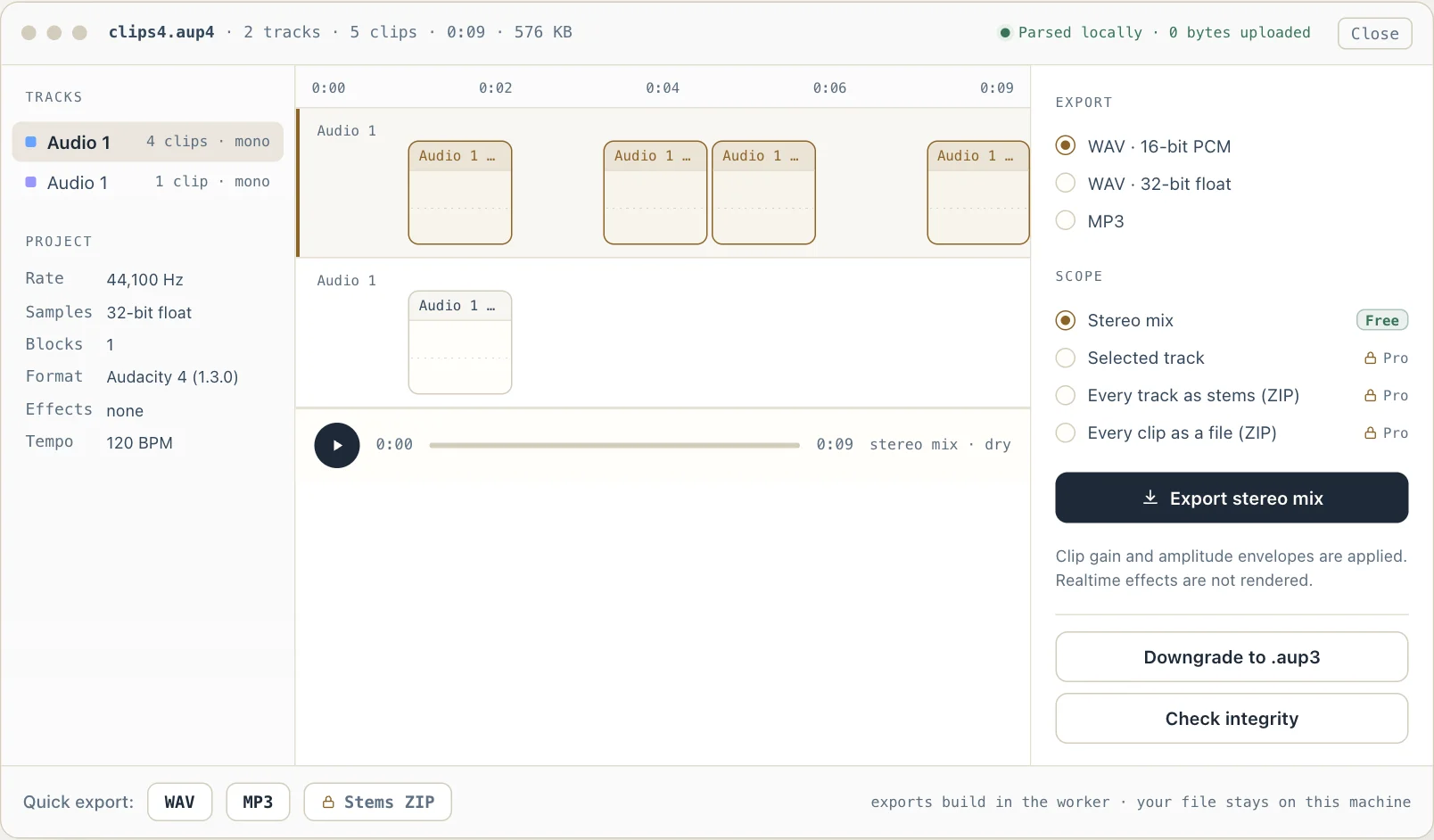
An unretouched screenshot of this site in Chrome 154 on macOS 27, 7 October 2026. The project in it is a test file from Audacity's own source repository — the same file this site's automated tests open.
Waveward — without uploading your audio
Waveward is a small set of tools built around one reader for the project files Audacity writes. It opens the three generations of the format: the .aup and _data folder of Audacity 1 and 2, the single-file .aup3 of Audacity 3, and the .aup4 of Audacity 4. On top of that reader sit the jobs people bring a project for.
They can play it, export the mix, cut it at its labels, convert a folder of projects at once, or shrink a file that has grown far past the audio it holds.
What runs where
A modern Audacity project is an SQLite database, so the reader is SQLite itself, compiled to WebAssembly and run in a Web Worker inside this tab. The project is read with the browser's File API. Only a license key, when you enter one, is sent to a server.
A project larger than about 1.5 GB, or one that would not fit in the device's memory, is read from the file a page at a time instead of being loaded whole. That way a long recording still opens and plays on a laptop or a phone.
- Formats
- .aup4 (Audacity 4), .aup3 (Audacity 3), .aup with _data (Audacity 1 and 2)
- Where it runs
- In the browser tab: SQLite in WebAssembly, in a Web Worker
- Uploads
- None; a license key is the only thing sent
- Free
- Open and play any project; export the mix up to 256 MB
New to the format? What an .aup4 file is, table by table — and how it differs from .aup3.
Before you trust a recording to a website
Q. Is Waveward made by Audacity?
No. Waveward is an independent project. Audacity is a trademark of Muse Group, and Waveward only reads the files Audacity writes. To edit a recording, use Audacity itself; Waveward is for the moments when it is not at hand.
Q. Which tools are here?
Every one has its own page, linked below: exporting the mix to MP3, WAV or an MP4 video, recovering a damaged project, turning an .aup4 back into an .aup3 for Audacity 3.7, transcribing a project to text, splitting the mix at its labels, converting a batch of projects into one ZIP, and saving a compact copy of a project.
Simple, one-time pricing
Opening a project, seeing its tracks and playing it are free forever, at any size your browser can hold; exporting the stereo mix and downgrading to .aup3 are free up to 256 MB. Recovery, stems, and larger exports and downgrades are a one-time unlock — no subscription, no recurring fees.
Everything you need to hear and export a project.
- Open .aup4 and .aup3 projects — locally; one too large to hold in memory is read from the file in pages
- Open old .aup projects (Audacity 1.x and 2.x) together with their _data folder
- See every track and clip; play the mix in the browser
- Export the stereo mix to WAV (16-bit or 32-bit float) or MP3, up to 256 MB
- Read the project's facts: sample rate, tracks, clips, blocks, saved-with version
- Downgrade .aup4 to .aup3 so Audacity 3.7 opens it again, up to 256 MB
- Run the integrity check and see the full recovery report
- See a project's labels; download them as Audacity's label file or copy them as timestamps
- See how much of a project file is space Audacity no longer uses
- Files never leave your device
Unlock recovery, stems and large projects for good — a single payment, yours to keep.
- Rebuild a corrupted project into a clean file Audacity opens
- Roll back to an earlier save kept inside the project
- Export every track, or every clip, as separate files in one ZIP
- Split the mix at its labels, or make one MP3 with a chapter per label
- Export a whole batch of projects to one ZIP at once
- FLAC, M4A (AAC), Opus and MP4 video; any sample rate; loudness to −14, −16 or −23 LUFS
- Render Audacity's built-in realtime effects (Reverb, Compressor, Limiter and more)
- Save a compact copy of a project, without the space Audacity left unused
- Transcribe a project to text or .srt subtitles, in the browser
- Export a 1.x/2.x project whose .aup is lost, put back together from its _data folder
- Export or downgrade projects larger than 256 MB
- Lifetime license — no renewals
Every job an Audacity project needs
Same local-first engine, one page per task.